Tasply
English

Why Tasply? Tasks + Simply = Tasply Your tasks, simply.

Android · free · beta

Stop planning days that end at 2 a.m.

Tasply is a simple to-do list that adds up your tasks and tells you honestly when you'll be done. Plan less, finish the day, and grow a forest along the way.

No account. No ads. Your data stays on your phone.

Today: work left and finish time

This is not a calendar.

You don't type in hours here. You don't book 2:00–3:00 pm for the laundry. You just say: laundry, about 40 minutes. Tasply puts your tasks in a row and does the math, so you can see whether the day actually fits – before it's midnight.

Why I built yet another to-do app

There are thousands of to-do apps. I built this one for myself, because none of them solved my real problem:

  1. I always planned too much – and then felt bad for not finishing, or sat up late at night to catch up.
  2. I didn't plan realistically. I had no idea that if I did everything on my list, I'd finish at 2 a.m.!
  3. I used sticky notes on the fridge. But you can't sort them, change them or tick them off. That's why every task in Tasply has a timer – so you can see how close your guess was to reality.
  4. I wanted a clear widget on my home screen, so I can see all day what's left to do – with adjustable transparency and text size.
  5. I noticed that some of my friends are really motivated by rewards for finished tasks. So I came up with planting a forest.
  6. I wanted categories and tags, to keep things in order.
  7. After a task we sometimes simply need to rest. In Tasply you can add a break after a task – and it counts in the plan.
  8. I missed a quick way to drop a task into a waiting room, and later – on a day that isn't full – pick tasks from it by priority.
  9. For procrastinators like me: don't do everything, just do one task. That's already a win.
  10. Moving a task "to tomorrow" with one tap, without guilt. It shows up today, tomorrow, the day after… and eventually I do it, just so it stops haunting me :)

I made Tasply for myself, but I think it can be useful to others too. It's a beta and I keep developing it – so maybe it will help you as well.

What's inside

Your day, with a finish time that doesn't lie

At the top you see how much work is left and when you'll be done, breaks included. Until you start something, Tasply doesn't guess. Once you do, every task gets a realistic end time. That's the moment you notice that seven tasks end at 10:15 pm – and move three of them to tomorrow.
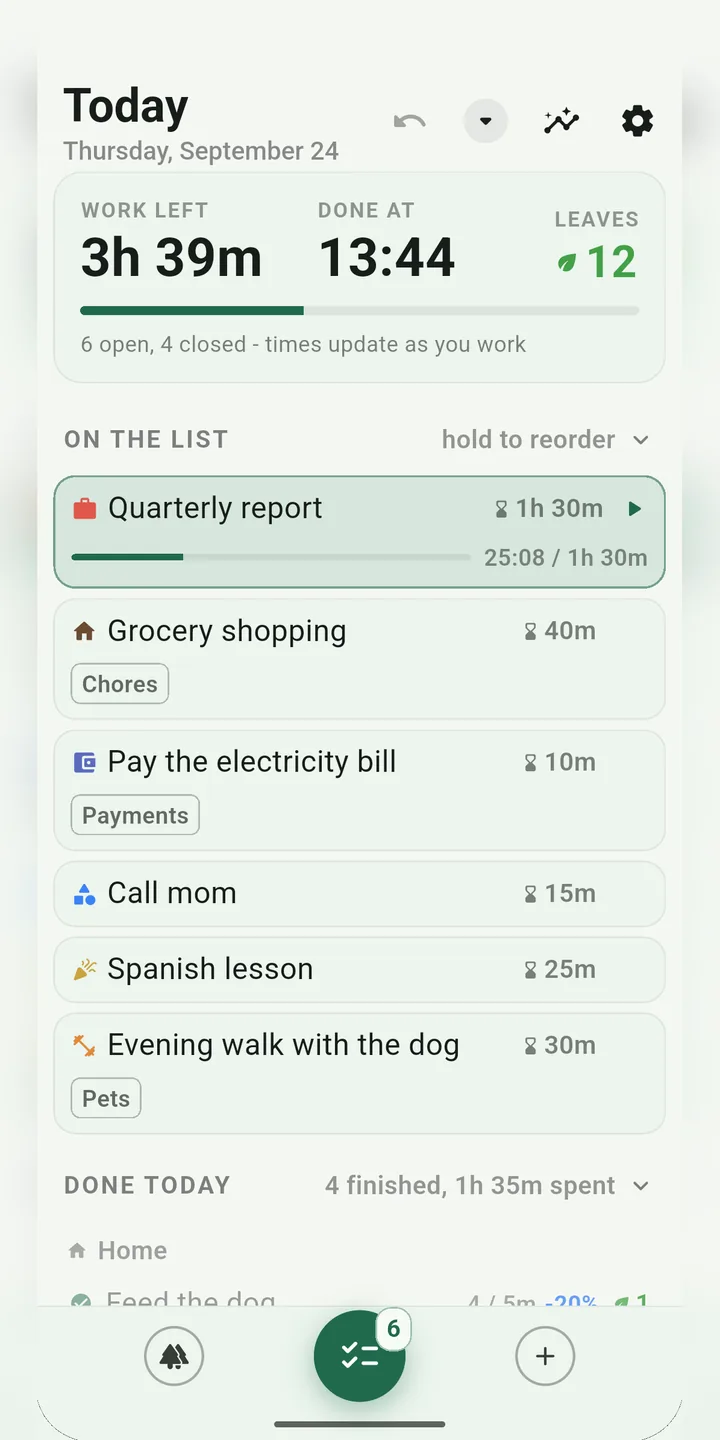
Today: work left and finish time

A waiting room for everything

Every idea goes into the waiting room first – no date, no pressure. When your day has room, pick a few tasks by priority and plan them for today, tomorrow or the day after with one button.

A stopwatch on every task

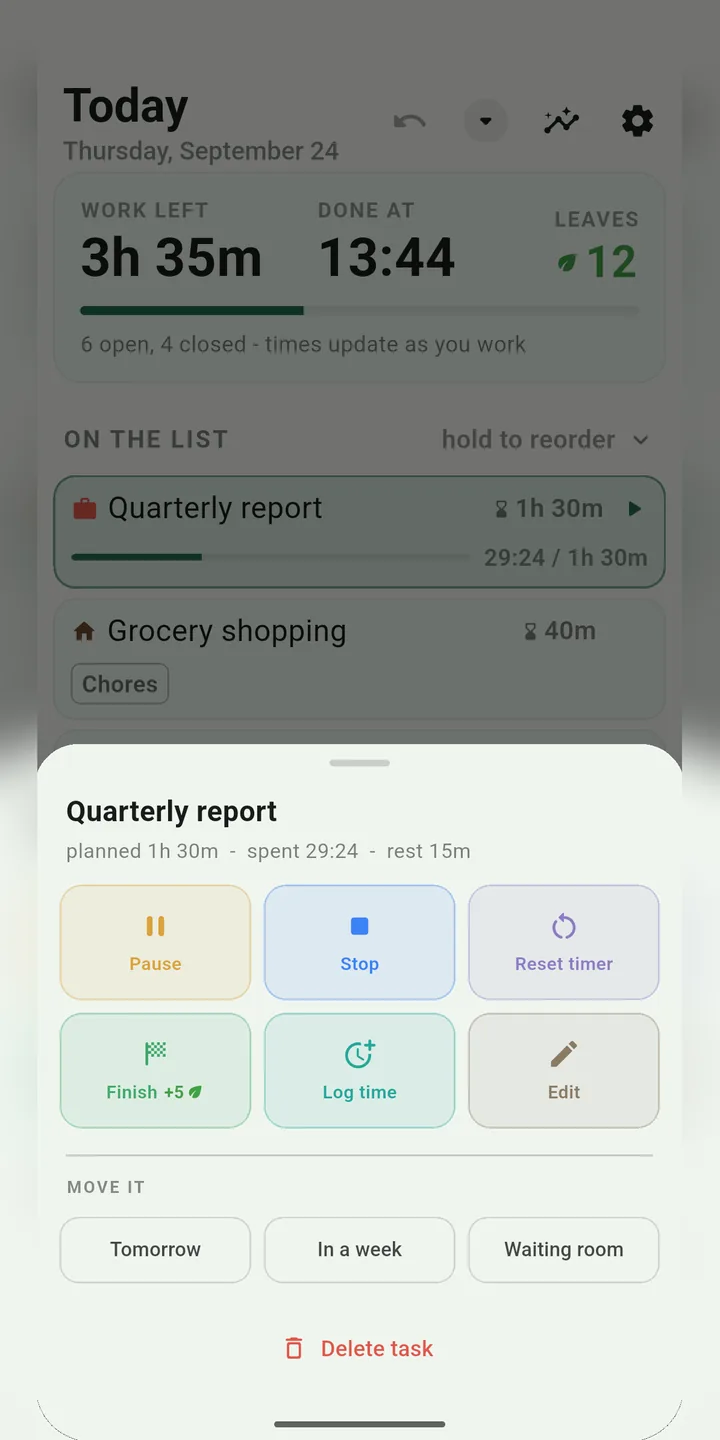
Start, pause, stop. You planned 30 minutes and it took 52? Tasply shows both side by side, also after you finish, and flags big misses. After a week you have hard data – and you start planning more realistically on your own.

Task actions: timer, finish, move

Tomorrow – without guilt

Didn't finish? Whatever's left moves to tomorrow by itself. You can also push a task to tomorrow, next week or back to the waiting room in one tap. No streaks to break, no red "overdue" counters.

A forest you can't lose

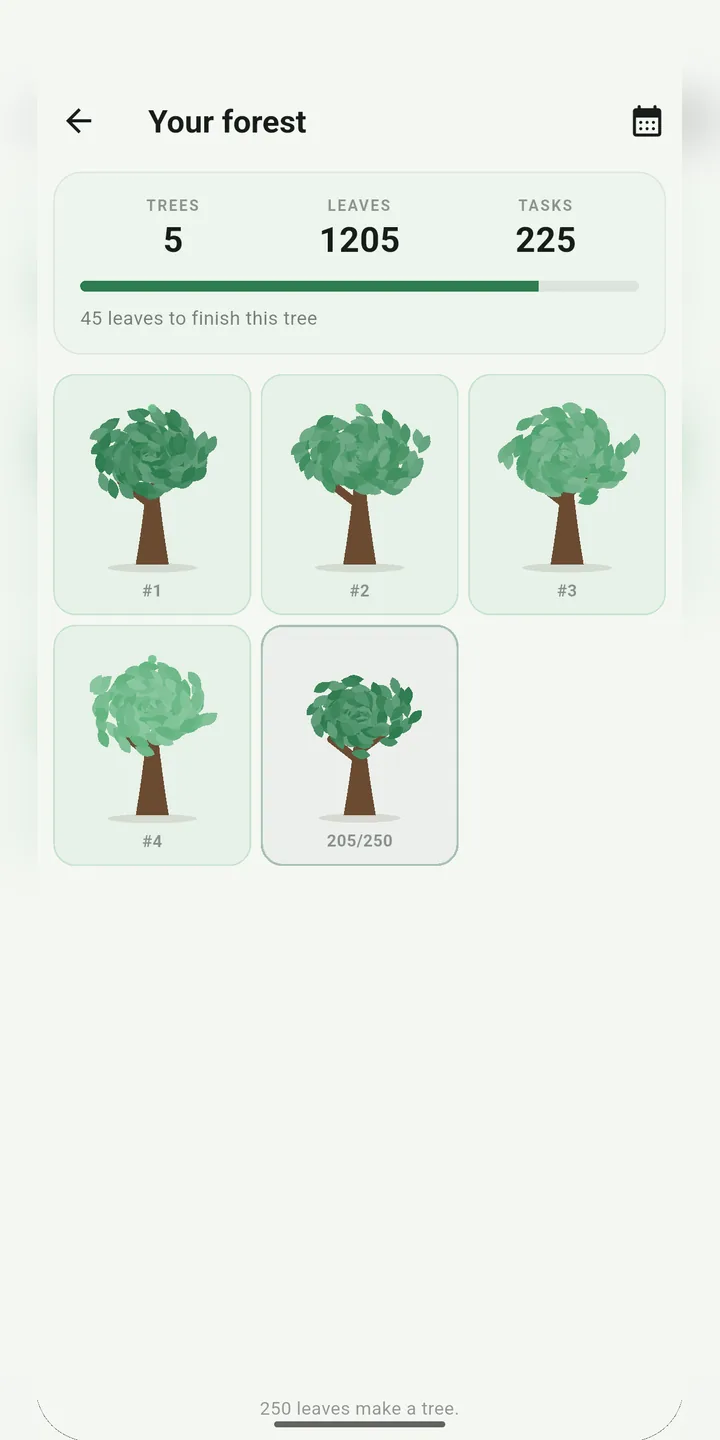
Every finished task earns leaves, depending on its length, priority and difficulty. Leaves grow into trees, trees into a forest. It never shrinks, never withers and never resets after a break.

Your forest

A widget you see all day

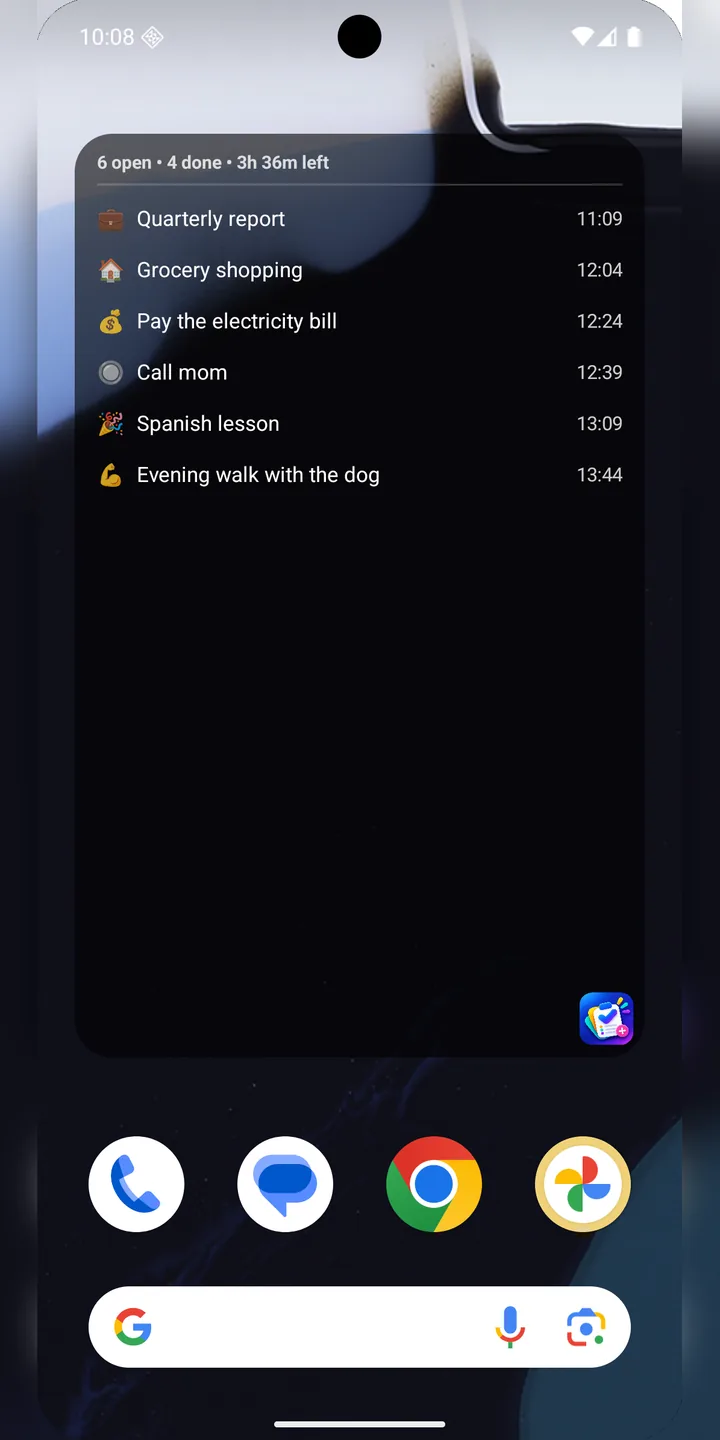
Today's list right on your home screen, with finish times. Set the background color, transparency and text size so it fits your wallpaper. There's also a quick-add widget.

Home screen widget

Stats that teach you to plan

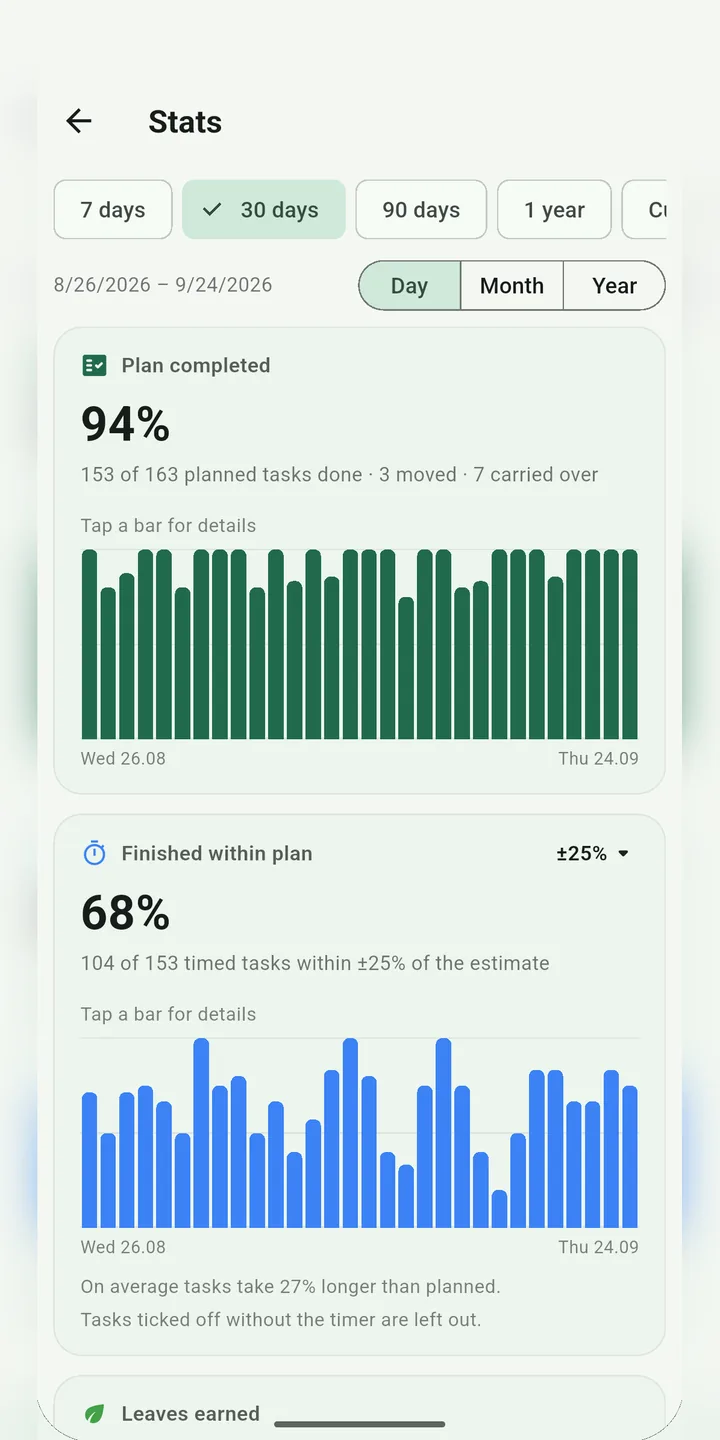
How much of your plan you really finish, how often you stay within your estimate, where your time goes by category, what plan size works for you and which tasks you keep postponing.

Stats: plan completed

Our goal

From your screen to a real forest

Every tree you grow in Tasply shouldn't stay on your screen. Our goal: plant as many real trees as all of you have grown together in the app. That way every finished task does more than tick a box on your list – it helps make our planet a little greener.

This is where we're heading, not a done deal yet. We'll share every step openly right here.

And also

How to use it – in 5 steps

  1. Drop everything into the waiting room

    Tap +, type a title (or say it) and set roughly how long it takes. That's it.

  2. Plan today

    Pick a few tasks from the waiting room and tap Today. Hold and drag to change the order.

  3. Start the first task

    Tap ▶. From now on Tasply shows when each task will end – and when your day ends.

  4. Finish, rest, repeat

    Tick the task off, take your break, start the next one. Leaves land in your forest.

  5. Too much? Move it

    If the finish time looks scary, send a few tasks to tomorrow. Nothing bad happens.

It's a beta – and it keeps growing

Tasply is in closed testing on Google Play (Android only for now). Want to try it? Write to me and I'll add you to the testers. Found a bug or have an idea? Let me know – the app is actively developed.

Private by design

No account, no ads, no tracking. All your data stays on your phone. This website doesn't use cookies or trackers either.